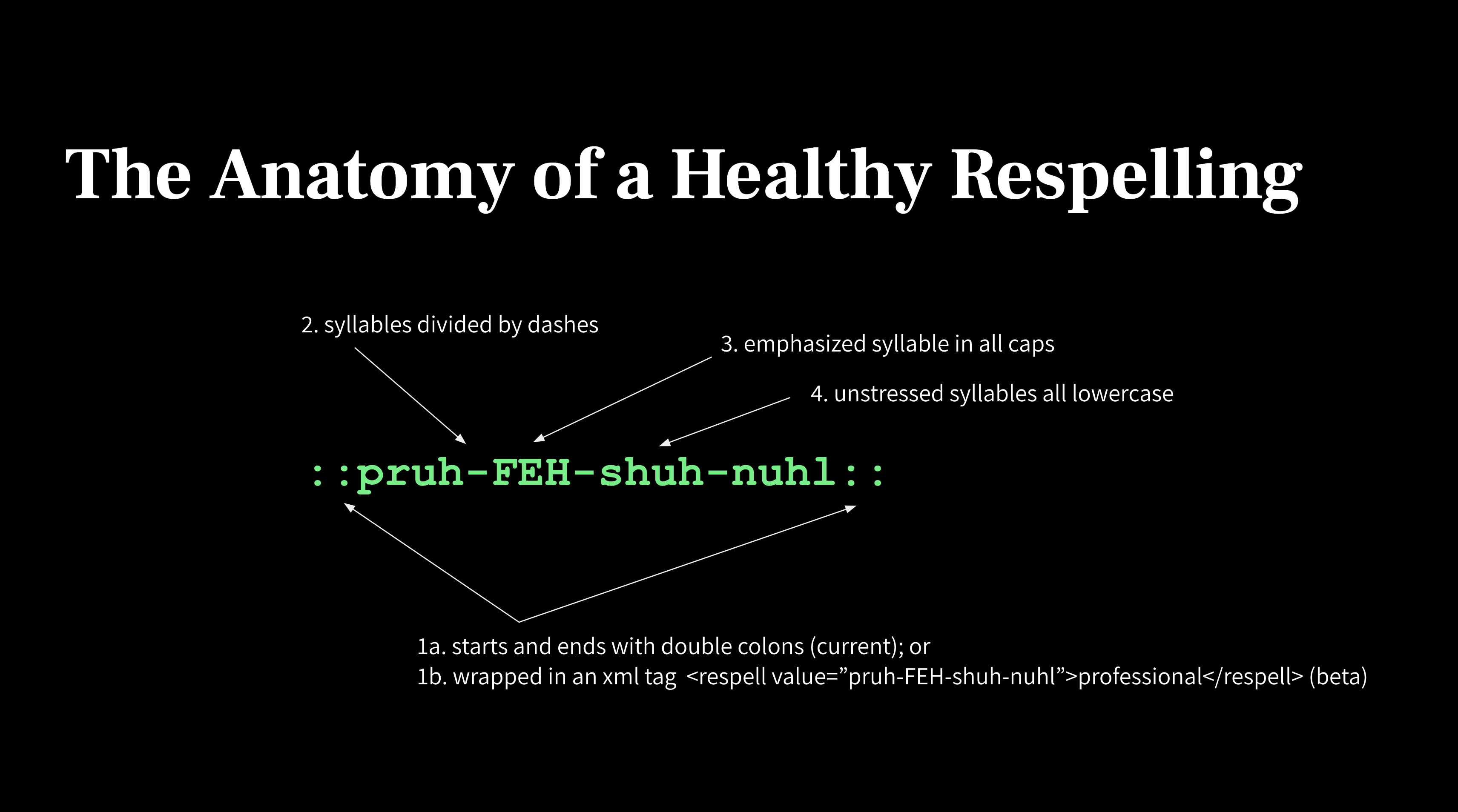
Sometimes a voice may pronounce a word differently than expected—especially with names, brand terms, acronyms, or technical vocabulary.
Respellings are WellSaid’s phonetic spelling system that allows you to control pronunciation by specifying how a word should sound.
How does Respellings work?
Respelling works by describing:
- How the word should be broken into syllables
- Which syllable(s) should be emphasized
Before creating a custom respelling, WellSaid also provides pronunciation suggestions that often resolve pronunciation issues quickly.
These suggestions appear in the Smart Toolbar and in the Replacements panel in the right sidebar, and include:
- Oxford Suggestions — A phonetic dictionary powered by Oxford Languages
- Smart Suggestions — AI-generated pronunciation recommendations available on Business and Enterprise plans
If you need to replace text that isn't phonetic—such as numbers, abbreviations, IDs, or phrases—you may want to use Replacements instead.
What Are Respellings?
A Respelling is a phonetic representation of a word that guides the voice's pronunciation.
Respellings break words into syllables and identify which syllable should be stressed.
Respellings are commonly used for:
- Proper names
- Brand terms
- Technical vocabulary
- Acronyms
- Words that the voice mispronounces
Respellings allow you to adjust pronunciation while keeping the written text intact.

Using Pronunciation Suggestions
Before creating a custom respelling, check the Smart Toolbar for pronunciation suggestions.
WellSaid provides two types of suggestions:
Oxford Suggestions
These suggestions are based on pronunciation data from the Oxford dictionary.
It provides pronunciation for over 251,000 words in British and American English, including industry-specific, uncommon, and complex words and terminology, which often resolve ~90% of pronunciation issues quickly.
Smart Suggestions
Smart Suggestions are AI-generated pronunciation recommendations that help with words not common in the dictionary:
- uncommon names
- brand terms
- specialized vocabulary
- words not covered by dictionary suggestions
Smart Suggestions are available on Business and Enterprise plans.
Recommended Workflow
When a word is mispronounced, follow this workflow:
- Highlight or double-click the word in the script.
- Check the Smart Toolbar for Oxford or Smart pronunciation suggestions.
- If none of the suggestions work, create a custom respelling. See Creating a Custom Respelling below.
Tip: Save respellings to your library so they can be reused across projects and keep pronunciation consistent.
If pronunciation suggestions do not resolve the issue, you can create your own phonetic respelling.
Using Respellings in the Right Sidebar
The recommended way to create respellings is through the Replacements panel in the right sidebar.
- Highlight or double-click the word in the editor.
- In the Smart Toolbar, click + New replacement.
- The Replacements panel opens in the right sidebar with the original word already added.
- Enter the phonetic spelling in the Replacement field.
- Turn on Phonetic Respelling.
- Save the entry to your Pronunciation Library.
Saving respellings allows them to be reused across projects and ensures consistent pronunciation.
Respelling Rules
Respellings control pronunciation by describing how a word should sound. When creating a respelling, you define:
- Syllable breaks — how the word should be divided
- Stress — which syllable should be emphasized
These rules apply when creating a respelling using the Replacements panel.
Syllable Breaks: Use hyphens (-) to separate syllables so the voice understands how the word should be broken down.
Example:
mis-sis-SIP-ee
Stress: Use capital letters to indicate which syllable should be emphasized.
Example:
sask-ACH-oo-when
Most English words have at least one stressed syllable. In some cases—such as acronyms or brand names—multiple syllables may be emphasized.
Respelling Reference Charts
If you're unsure how to represent a sound when creating a custom respelling, you can use the Respelling Reference Charts.
These charts provide examples of common phonetic sounds and syllable patterns to help you construct accurate respellings.
They can be especially helpful when working with:
- unfamiliar names
- specialized terminology
- uncommon vowel or consonant sounds
See the Respellings Reference Charts for a full list of phonetic pronunciation.
Advanced: Inline Respelling Syntax (Standard Model Only)
The Standard model also supports inline respellings written directly in the editor.
Example:
Inline respellings must be wrapped in double colons: ::sask-ACH-oo-when::
Inline respellings can be useful for quick testing, but they are not saved to your pronunciation library.
For most workflows, we recommend creating respellings using the Replacements Panel in the right sidebar so pronunciations can be reused and managed centrally.
Respellings vs Replacements
Respellings and Replacements both affect how text is spoken, but they solve different problems.
Respellings
Respellings control how a word is pronounced using phonetic spelling.
They are best used when a word is spelled correctly but pronounced incorrectly.
Example:
Saskatchewan sask-ACH-oo-when
Replacements
Replacements substitute one piece of text with another when the voice reads it.
They are useful when the written text does not match what should be spoken.
Example:
Original text: 1099-MISC Spoken output: ten ninety-nine misc
Replacements are commonly used for:
- Numbers
- IDs or codes
- Abbreviations
- Phrases
- Words that should always be spoken a certain way
How They Work Together
Respellings are created within the Replacements system.
A Replacement rule can either:
- substitute text with different spoken words, or
- apply a phonetic respelling that controls pronunciation.
Turning on Phonetic Respelling converts the replacement rule into a pronunciation rule instead of a text substitution.
Use a Respelling when:
- a word is pronounced incorrectly
- you want phonetic control over pronunciation
- the word is a name, brand, or uncommon term
Use a Replacement when:
- the written text should be spoken differently
- you are working with numbers, codes, abbreviations, or phrases
- you want a pronunciation rule to apply consistently
For more information, see the Guide to Replacements.
Troubleshooting Respelling Errors
If a respelling does not work or a clip fails to render, the issue is usually related to formatting or how the respelling was created.
Most pronunciation issues are resolved by creating respellings using the Replacements panel in the right sidebar:
- Highlight or double-click the word in the editor.
- Click + New replacement in the Smart Toolbar.
- Enter the phonetic spelling.
- Turn on Phonetic Respelling toggle.
- Preview the pronunciation.
- Save the entry to your Pronunciation Library.
If you are typing respellings directly in the script using inline syntax, remember that this is only supported by the Standard model and requires specific formatting.
If you’re unsure how to represent a sound, refer to the Respellings Reference Charts.
| Error | Cause | Fix | Example |
| “Please format your respelling correctly” | The respelling syntax is invalid. |
Ensure the respelling:
|
✅ ihg-ZAM-puhl ⛔ ihg ZAM puhl ⛔ ihg-Zam-puhl |
| “Respelling must wrap some text.” | Punctuation or numbers placed directly next to a respelling can interfere with parsing. |
Add a space between the respelling and punctuation or numbers. If the respelling was saved to your library, ensure there’s a space between the respelling and characters in the editor. |
✅ ihg-ZAM-puhl dot com ⛔ ihg-ZAM-puhl.com ✅ 1 OH ⛔ 1OH |
| Acronym punctuation edge case | Certain punctuation combinations can affect pronunciation. | Try adding a space between the acronym and puncutation. |
✅ Y-SEE-DEE - 10 ✅ ICD - 10 ⛔ (Y-SEE-DEE)-10 |
| Respelling cannot contain Q or X. | Because the respelling system uses specific phonetic sound mappings, those sounds are represented with other characters. | Review Respelling Reference Charts to find the equivalent letter. |
✅ ihg-ZAM-puhl ⛔ EX-am-puhl |
Still getting an error?
If you previously added respellings to your Pronunciation Library that contain diacritics or special characters, pronunciation may fail.
If this happens, try:
- removing the special characters
- updating the respelling in the Pronunciation Library page.