Article overview
Respellings let you fix pronunciation by writing out how a word should sound. Create, format, and troubleshoot respellings in WellSaid Studio.
Sometimes a voice mispronounces a word—especially a name, brand term, or piece of technical vocabulary. Respellings give you a direct way to fix that by writing out exactly how a word should sound.
What are respellings?
A respelling is a phonetic representation of a word that guides how the voice pronounces it.
Respellings are commonly used for:
- Proper names
- Brand terms
- Technical vocabulary
- Acronyms
- Words the voice mispronounces
Respellings let you adjust pronunciation while keeping the written text intact.

How respellings work
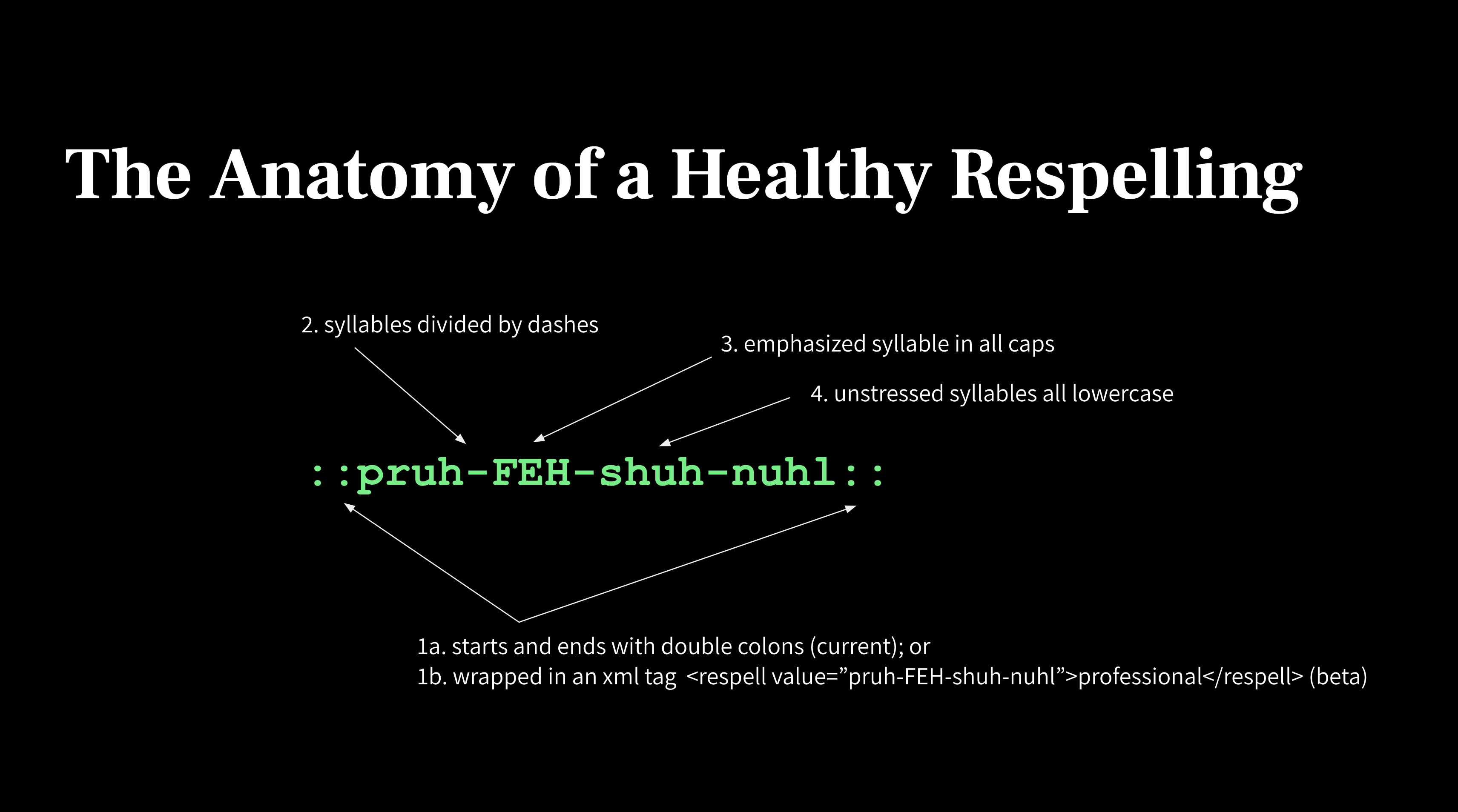
A respelling describes:
- How the word should be broken into syllables
- Which syllable(s) should be emphasized
Before creating a custom respelling: Check for pronunciation suggestions first. They often resolve pronunciation issues quickly.
Suggestions appear in the Smart Toolbar and in the Replacements panel in the right sidebar, and include:
- Oxford Suggestions — A phonetic dictionary powered by Oxford Languages
- Smart Suggestions — AI-generated pronunciation recommendations
If you need to replace text that isn't phonetic—such as numbers, abbreviations, IDs, or phrases—use Replacements instead.
Using pronunciation suggestions
Before creating a custom respelling, check the Smart Toolbar for pronunciation suggestions. WellSaid provides two types:
Oxford Suggestions
Oxford Suggestions are based on pronunciation data from the Oxford dictionary. They cover over 251,000 words in British and American English—including industry-specific, uncommon, and complex terms—and often resolve ~90% of pronunciation issues quickly.
Smart Suggestions
Smart Suggestions are AI-generated pronunciation recommendations that help with words not commonly found in the dictionary:
- Uncommon names
- Brand terms
- Specialized vocabulary
- Words not covered by dictionary suggestions
Recommended workflow
When a word is mispronounced, follow these steps:
- Highlight or double-click the word in the script.
- Check the Smart Toolbar for Oxford or Smart pronunciation suggestions.
- If no suggestions work, create a custom respelling. See Creating a respelling below.
Tip: Save respellings to your library so they can be reused across projects and keep pronunciation consistent.
Creating a respelling
To create a respelling using the Replacements panel:
- Highlight or double-click the word in the editor.
- In the Smart Toolbar, click + New replacement.
- The Replacements panel opens in the right sidebar with the original word already filled in.
- Enter the phonetic spelling in the Replacement field.
- Turn on Phonetic Respelling.
- Save the entry to your Pronunciation Library.
Saving respellings allows them to be reused across projects and ensures consistent pronunciation.
Respelling rules
When creating a respelling, you define:
- Syllable breaks — how the word should be divided
- Stress — which syllable should be emphasized
Syllable breaks: Use hyphens (-) to separate syllables.
Example:
mis-sis-SIP-eeStress: Use capital letters to indicate the emphasized syllable.
Example:
sask-ACH-oo-whenMost English words have at least one stressed syllable. Acronyms or brand names may have multiple.
Respelling Reference Charts
If you're unsure how to represent a sound, use the Respelling Reference Charts. They provide examples of common phonetic sounds and syllable patterns, and are especially helpful for:
- Unfamiliar names
- Specialized terminology
- Uncommon vowel or consonant sounds
See the Respellings Reference Charts for a full list of phonetic pronunciations.
Respellings vs. Replacements
Respellings and Replacements both affect how text is spoken, but they solve different problems.
Respellings
Respellings control how a word is pronounced using phonetic spelling. Use them when a word is spelled correctly but pronounced incorrectly.
Example:
Saskatchewan → sask-ACH-oo-whenReplacements
Replacements substitute one piece of text with another when the voice reads it. Use them when the written text does not match what should be spoken.
Example:
Original text: 1099-MISC
Spoken output: ten ninety-nine miscReplacements are commonly used for:
- Numbers
- IDs or codes
- Abbreviations
- Phrases
- Words that should always be spoken a certain way
How they work together
Respellings are created within the Replacements system. A Replacement rule can either substitute text with different spoken words, or apply a phonetic respelling that controls pronunciation.
Turning on Phonetic Respelling converts the replacement rule into a pronunciation rule instead of a text substitution.
Use a Respelling when:
- A word is pronounced incorrectly
- You want phonetic control over pronunciation
- The word is a name, brand, or uncommon term
Use a Replacement when:
- The written text should be spoken differently
- You are working with numbers, codes, abbreviations, or phrases
- You want a pronunciation rule to apply consistently
For more information, see the Guide to Replacements.
Troubleshooting respelling errors
If a respelling doesn't work or a take fails to render, the issue is usually related to formatting or how the respelling was created.
To troubleshoot using the Replacements panel:
- Highlight or double-click the word in the editor.
- Click + New replacement in the Smart Toolbar.
- Enter the phonetic spelling.
- Turn on the Phonetic Respelling toggle.
- Preview the pronunciation.
- Save the entry to your Pronunciation Library.
If you're unsure how to represent a sound, refer to the Respellings Reference Charts.
| Error | Cause | Fix | Example |
| "Please format your respelling correctly" | The respelling syntax is invalid. |
Ensure the respelling:
|
✅ ihg-ZAM-puhl ⛔ ihg ZAM puhl ⛔ ihg-Zam-puhl |
| "Respelling must wrap some text." | Punctuation or numbers placed directly next to a respelling can interfere with parsing. |
Add a space between the respelling and any punctuation or numbers. If the respelling was saved to your library, ensure there's a space between the respelling and surrounding characters in the editor. |
✅ ihg-ZAM-puhl dot com ⛔ ihg-ZAM-puhl.com ✅ 1 OH ⛔ 1OH |
| Acronym punctuation edge case | Certain punctuation combinations can affect pronunciation. | Try adding a space between the acronym and punctuation. | ✅ Y-SEE-DEE - 10 ✅ ICD - 10 ⛔ (Y-SEE-DEE)-10 |
| Respelling cannot contain Q or X. | The respelling system uses specific phonetic sound mappings. Those sounds are represented with other characters. | Review the Respelling Reference Charts to find the equivalent letter. | ✅ ihg-ZAM-puhl ⛔ EX-am-puhl |
Still getting an error?
If you previously added respellings to your Pronunciation Library that contain diacritics or special characters, pronunciation may fail. Try:
- Removing the special characters
- Updating the respelling in the Pronunciation Library page
FAQs
Q: What's the difference between a respelling and a replacement?
A: A respelling controls how a word is pronounced using phonetic spelling. A replacement swaps the written text with different spoken words. Both are created through the Replacements panel—enabling the Phonetic Respelling toggle converts a replacement into a pronunciation rule.
Q: Can I reuse a respelling across multiple projects?
A: Yes. Save the respelling to your Pronunciation Library, and it will apply consistently wherever that word appears across your projects.
Q: Why can't I use the letters Q or X in a respelling?
A: The respelling system uses phonetic sound mappings, and those sounds are represented by other characters. Refer to the Respellings Reference Charts to find the correct equivalent.
Q: What should I do if a pronunciation suggestion doesn't fix the issue?
A: If neither Oxford nor Smart Suggestions resolves the mispronunciation, create a custom respelling using the Replacements panel. Use the Respellings Reference Charts to help construct the phonetic spelling.