September 2026
New Features
Insights Dashboard Updates (Enterprise only)
The Insights Dashboard now supports up to a full year of usage history, up from 180 days, and admins can export usage data to CSV directly from the dashboard.
August 2026
New Features
Generate Audio for All Sections
Rendering long scripts just got a lot faster — you can now generate every section in your project in one click instead of rendering section by section. Access it anytime with the Generate All button in Studio.
Audition: Find the Right Voice for Your Project
Not sure which voice fits your project? Describe it in your own words and get a ranked, personalized set of voice matches — complete with a preview in your own script. Head to the Voices page and select the Audition tab to try it out.
Preview Upcoming Voice Models
You can now test Preview 13.2, the latest addition to our upcoming voice models. To access it, select Preview Models > 13.2 from the model dropdown on any voice.
July 2026
New Features
Introducing add-ons: add more minutes to your plan
Need more minutes before your plan renews? Add-ons let you add extra minutes to your current plan – active the moment you buy, renewing monthly until you cancel. Learn more about Adding More Minutes to Your Plan.
Preview Upcoming Voice Models
You can now preview upcoming WellSaid voice models before they're released. A new Preview option appears in the voice model dropdown so you can test it on real projects. Learn more.
Tell Us When Something Sounds Off: Audio Quality Feedback
Every generated take in WellSaid Studio now has a quick thumbs up / thumbs down control, so you can flag audio quality issues the moment you hear them — no support ticket required.
What's new
- Rate any take with a thumbs up or thumbs down right after it's generated
- Thumbs down lets you pick a category and add an optional note
- Your feedback goes directly to the team working on WellSaid's voice model quality
Feedback is saved as soon as you submit it and can't be edited afterward, so take a second look before sending.
May 2026
New Features
Section Reorder: Drag and Drop
You can now reorder sections in Studio by dragging them to a new position using the icon to the right of the section. To move multiple sections, select the sections first, then use the drag icon to move them together.
The updated order is reflected everywhere — continuous global playback and when downloading combined files. Your takes and rendered audio are untouched.
Note: reordering is disabled during active playback. Stop playback first, then drag.
March 2026
New Features
Pause Between Sections & Continuous Playback
You can now control the pause between sections in your project and play your entire script from top to bottom in one go.
Translation (Enterprise only)
You can now translate and generate audio in any supported language directly in WellSaid Studio — without rebuilding your project from scratch.
February 2026
New Features
Apply Cues Across Multiple Sections
Script editing just got faster and more efficient with bulk cues. Select multiple sections in your project and apply a cue from the sidebar to update them all at once. This makes it easy to apply pacing, pitch, loudness, or emotional presets across an entire script in seconds.
Studio Update: A Simpler Way to Create Audio
We’ve updated WellSaid Studio to make creating audio across models and languages easier and more flexible.
What’s new
- One unified, script-first experience for all voice models
- No more choosing project types based on model or language
- Model selection now happens within the project, not at creation
- Support for importing scripts written in non-Latin character sets, including Chinese, Arabic, Korean, and more
What’s staying the same
- Existing projects remain accessible and unchanged
- Legacy project types are still accessible
What we recommend
For the best experience and access to the latest features, we recommend creating new projects using WellSaid Studio.
December 2025
New Features
Combine Clips
You can now combine multiple rendered sections into a single audio file—directly in a Caruso project.
Rename Download files
Automatically apply consistent, structured naming to bulk downloads — including project names and sequential numbering — without manual renaming.
Pause Cue
You can now add intentional pauses to better control pacing and delivery in our voiceovers.
Collapse Sections
Managing large projects just got easier.
What’s new:
- Collapse and expand sections to reduce scrolling
- Focus on the parts of your script you’re actively working on
- Navigate projects with many sections more efficiently
Less clutter, faster navigation, and better focus—especially for long scripts.
November 2025
New Features
Introducing the new Insights Dashboard for Enterprise
Enterprise Admins can now view key usage metrics — clips created, downloads, trends over time, and active users — all in one place. The Insights dashboard gives teams a clear view of seat utilization, engagement, and overall Studio adoption.
Available now for Enterprise Admins under Account Settings → Usage & Insights.
Smart Toolbar: Rewrite for Speech & Emphasis
Create clearer, more natural-sounding voiceovers with two new Smart Toolbar actions — Rewrite for Speech and Emphasis.
- Rewrite for Speech: Refines text for smoother text-to-speech delivery, improving how numbers, dates, measurements, and units are read while keeping your tone and meaning.
- Emphasis: Highlights key words to guide natural stress and adjust tone for a more expressive read.
Make your scripts sound more natural and expressive — without extra manual edits.
Project Transfers for Team Management
Easily reassign a team member’s projects when they’re removed from a team — so nothing gets lost and work keeps moving smoothly.
Transfer Work Options:
When removing a team member (Account Settings → Team → Remove Member), admins can now choose where their projects go:
Team Drive — shared space for all team members
Workspace — specific workspace within the team drive
Admin’s Personal Drive — transfer projects directly to your account
Or, choose Do Not Transfer to remove the member but leave their projects in their personal workspace.
Keep projects accessible and ensure smooth handoffs across your team.
Available for Business and Enterprise teams (Admin access required).
48 kHz & 96 kHz Audio Now Available in Caruso (Enterprise only)
We’ve expanded Caruso’s audio fidelity options — you can now generate studio-quality voiceovers at 48 kHz or 96 kHz sample rates directly in your Caruso Projects.
What’s New
- 48 kHz – Ideal for broadcast, video, and high-quality web playback.
- 96 kHz – Our highest-fidelity output yet, built for post-production, film, and professional mastering workflows.
- Only .wav files are supported at this output.
- Both options are available in Caruso projects
Higher sample rates mean smoother, richer sound reproduction — especially noticeable in music-backed ads, eLearning modules, and voiceovers that undergo additional mixing or mastering.
New Languages
New Partner Voices: Czech, Dutch, Danish, Polish, and Swedish.
We’ve added 15 new partner voices to support global content creation with coverage for Belgium, the Czech Republic, Denmark, the Netherlands, Poland, and Sweden.
- 5 Dutch (Netherlands/Belgium)
- 3 Polish
- 3 Swedish
- 2 Czech
- 2 Danish
Available on Enterprise plans.
Bug Fixes
Resolved an issue that prevented the Smart Toolbar from displaying on Windows.
Restored the “Current Script” tab in the Replacement Libraries modal in Caruso projects.
Fixed an issue where script line breaks were not preserved after refresh in Caruso projects.
Fixed overlapping audio when navigating away from a project.
October 2025
New Features
Introducing the all new Studio
A faster, more intuitive way to create and edit voiceovers.
We’ve redesigned the Studio experience from the ground up to make creating with WellSaid smoother, smarter, and more scalable — whether you’re producing a 15-second ad or a 10-minute training module.
What’s new
-
Script-First Editing
Your full script is always visible — no more jumping between clips or tabs. Easily organize, edit, and preview your content section by section, all in one view. -
Smarter Section Management
Upload or paste your script and automatically split it by paragraph or sentence. Edit or assign multiple speakers for natural dialogue and longer-form workflows. -
Faster Rendering & Improved Workflow
Render individual sections or multiple takes without losing your place. Built to handle large projects seamlessly, so you can focus on fine-tuning performance instead of waiting. -
Advanced Voice Controls
Refine your audio with improved Cues for pace, pitch, and loudness — plus emotional presets that make it easy to shape tone and intent.
Why you’ll love it
The new Studio is built to give you more control and more speed — from first draft to final render. It’s intuitive enough for quick projects and powerful enough for full-scale production.
Try it now
To experience the updated Studio, simply create a new project and select Caruso as your model.
September 2025
New Features
Upload Script
You can now upload your scripts directly into Studio, making it faster and easier to start creating.
- Upload
.txt,.pdf, or.docxfiles - Add scripts via drag & drop, file browse, or paste a URL (permissions may apply)
- Works with English and Latin-based languages (Portuguese, French, Spanish, German, Italian)
This feature saves you time at the very first step, so you can spend less time managing text and more time creating great content.
Smart Suggestions for Respellings (English only)
Quickly improve pronunciation for tricky words like names, acronyms, product terms, slang, loanwords, and even fictional names. Highlight a word to see the toolbar and generate Smart Suggestions, preview, and apply the best fit.
Available for Business and Enterprise users.
New Partner Voices: Arabic, Persian & Turkish
We’ve added 36 new partner voices to support global content creation with native coverage for Algeria, Bahrain, Egypt, Iraq, Iran, Jordan, Kuwait, Lebanon, Libya, Morocco, Oman, Qatar, Saudi Arabia, Syria, Tunisia, Turkey, United Arab Emirates, Yemen.
- 32 Arabic
- 2 Turkish
- 2 Persian
Available on Enterprise plans.
July 2025
New Feature
Smart Replacement Toolbar
We’ve overhauled the Replacements workflow to make pronunciation fixes faster, simpler, and fully inline.
- Highlight any word in the script to activate the Smart Toolbar
- Instantly see if a replacement exists — no need to open the full library
- Add new replacements inline, with the sidebar pre-filled for speed
- Get pronunciation suggestions directly from the Oxford Dictionary
- Preview the pronunciation directly from the toolbar
Whether you're correcting a tricky name or fine-tuning delivery, the right tool is now just a highlight away.
Available in all projects.
June 2025
New Feature
Voice Style Available
We've added a new Promo style for Benedict M. Recommended use case: Advertising and Marketing.
May 2025
New Features
Team Commenting
Team collaboration just got easier. Creatives, reviewers, and stakeholders can now leave feedback directly on clips—no more tool switching or messy threads.
- Drop comments on individual clips in a shared project
- @mention teammates to send email alerts
- Resolve threads to keep things tidy
Centralizes feedback and decision-making all in Studio. Available in Business & Enterprise plans.
New Partner Voices: Chinese, Japanese & Korean
We’ve added 16 new partner voices to support global content creation, with native coverage for Mandarin, Cantonese, Japanese, and Korean.
- 6 Mandarin
- 2 Cantonese
- 4 Japanese
- 4 Korean
Available on Enterprise plans.
New API Features
Clip Combination API
Our new API endpoint enables customers to stitch together multiple clips into a single audio file with fine-tuned pause control.
- Stitch up to 100 clips
- Add uniform or custom pauses (in seconds)
- Output one seamless audio file
Doc: Endpoint Playground
April 2025
New Features
Caption Files
Enterprise users can now download SRT and VTT files with their audio clips, for easy transcription and captioning, and increased accessibility.
- Save time - No need for manual transcription—export files instantly.
- Improved Accessibility - Helps meet compliance requirements for captions.
- Flexible Formats - Choose SRT for video subtitles or VTT for web-based captions.
-
Better Content Repurposing - Quickly create text-based content from audio clips.
UK Respellings Suggestions
WellSaid’s Oxford Dictionary integration for enhanced Respellings now includes phonetic spellings for UK dialects. Users can type in a word into the replacements feature, and the Oxford suggestions will now display both US and UK phonetic spellings of words.
Take, for example, the word aluminum:
US pronunciation: ah-loo-MIN-um
UK pronunciation: al-yoo-MIN-ee-um
Users are encouraged to use the dictionary when searching for correct pronunciations when using WellSaid's UK or US Voices.
March 2025
New Features
- Beta projects are now Caruso – Existing projects remain unchanged, but Voices have been upgraded for greater naturalness and quality.
- Say It Right the First Time – Accurate pronunciation, natural pacing, and flawless intonation—no endless re-renders.
- Unmatched Audio Clarity – Crisp, polished AI voice output.
- Greater Control – Fine-tune pitch, pace, and volume with Cues for a more engaging performance.
Team Workspaces provide a secure and efficient way for Enterprise teams to collaborate. Create dedicated workspaces where only invited team members can view, edit, and manage projects, ensuring better security, organization, and workflow control.
Any project created within a Team Workspace is automatically accessible to all team members, eliminating the need to share individual files manually. It’s a smarter, more intuitive way to work together.
- Improved collaboration – Keep workspaces focused and clutter-free.
- Better organization – Manage projects more efficiently within teams.
- Enhanced security – Restrict access to only designated users.
- Flexible permissions – Admins can create workspaces and assign access anytime.
Now available for Enterprise users. For more information about our Enterprise plan, please contact our Sales team.
New API Features
Speech Marks API Now Available
The new Speech Marks endpoint provides developers with word-level timing metadata, enabling:
- Synchronized animations with TTS output
- Auto-generated subtitles (SRT & VTT) for video workflows
- Improved accessibility with precise timing for captions and screen readers
- Lip-syncing & character animation in interactive applications
Docs: Speech Marks API | Help Article
Avatar GET Request Now Includes Gender
Developers can now filter avatars by gender in the response.
Docs: Avatar API Update
February 2025
New Features
French and Quebecois French Voices Available
We've introduced seven new high-quality French and Québécois French voices to the Studio!
French-Canadian (Québécois)
- Claire B. (CA) - Narration (Calm, Deep, Serious), Use Case: News
- Louis B. - Narration (Youthful, Bright, Fast-paced), Use Case: E-Learning
- Marie D. - Narration (Mature, Calm, Serious), Use Case: E-Learning
- Rehan X. - Narration (Youthful, Bright, Casual), Use Case: E-Learning
French
- Joel F. - Narration (Youthful, Fast-paced, Midrange), Use Case: Advertising
- Juliette W. - Narration (Youthful, Bright, Casual), Use Case: Advertising
- Marco X. - Narration (Deep, Mature, Steady, Warm), Use Case: Advertising
Preview our new voices directly on the Voices Page! For more details about our latest French voices, reach out to our Sales team.
Bug fixes and improvements
Fixed an issue where Windows users saw a blank panel in Adobe Premiere Pro when using the WellSaid Voiceover extension. Windows users can reinstall the latest version here.
January 2025
New Features
New Hindi-accented English Voices Available
We’re excited to introduce five new Hindi-accented English voices to WellSaid Studio and API:
- Aakash K. (HI) - Narration (Recommended use case: Educational)
- Rachin K. (HI) - Conversational (Recommended use case: Learning and Development)
- Rohini B. (HI) - Narration (Recommended use case: News)
- Spiti V. (HI) - Narration (Recommended use case: News)
- Veer S. (HI) - Promo (Recommended use case: Advertising)
Whether you’re creating engaging learning materials, delivering authoritative news, or producing warm, inviting ads, these new voices bring a fresh perspective to your projects.
November 2024
New Features
Spanish Voices Available
We’re excited to introduce five new Spanish voices available to WellSaid Studio and API!
- Antony (MX) - Narration (Recommended use case: Educational Nonfiction)
- Hannah (MX) - Narration (Recommended use case: Fiction Audiobooks)
- Jessica (MX) - Narration (Recommended use case: Advertising)
- Jimena (MX) - Narration (Recommended use case: News Delivery)
- Jose (MX) - Narration (Recommended use case: News Delivery)
For more information about our new Spanish voices, please contact our Sales team.
English Voices Available
We’re excited to announce the addition of seven new English voices to WellSaid Studio and API:
- Frankie (UK) - Narration (Recommended use case: Educational Content)
- Melissa (UK) - Narration (Recommended use case: News Delivery)
- Lara (AU) - Narration (Recommended use case: Advertising)
- Robert (AU) - Narration (Recommended use case: News Delivery)
- Sonny (AU) - Narration (Recommended use case: Fictional Audiobooks)
- Jennie (US) - Narration (Recommended use case: Fictional Audiobooks)
- Tosh (US) - Conversational (Recommended use case: Educational Content)
Ready to try them out? Head over to the "Recently Added" section on the Voices page and bring your next project to life with these incredible voices!
Folders and Workspaces are Here for Business and Enterprise Customers!
We’re thrilled to announce the launch of folders and personal/team workspaces for our Business and Enterprise customers — powerful tools to help you work smarter and collaborate effortlessly.
Here’s what’s now available:
-
Create Folders
Organize your projects with ease by creating folders. Nest folders within each other for deeper organization and keep everything structured just the way you need. You can access this feature on the Projects page by clicking “New.” -
Bulk Move
Save time with bulk move. Select multiple projects or folders and move them all at once. When multiple items are selected, an action bar will appear, making organizing faster and more efficient. -
Team Workspace
Simplify collaboration with a team workspace. Any project created within a team workspace is automatically accessible to all team members, eliminating the need to manually share individual files. It’s collaboration made simple and intuitive. -
Shareable Team Links
Easily direct teammates to projects using a direct link. Simply open the share modal from a project in the team drive, and you’re good to go!
We’re excited for you to explore these new features and make your workflows even more efficient. As always, we’d love to hear your feedback!
October 2024
New Integration
WellSaid Voiceover Extension for Adobe® Premiere Pro® is now available!
Streamline your video production workflow by accessing WellSaid Studio voiceover clips directly within Adobe® Premiere Pro®. Currently available for Business and Enterprise customers. Check out the extension here!
September 2024
New Features
Expanded Respellings Dictionary!
We’ve added over 10,000 new words to our Respelling dictionary, including more than 9,000 specialized terms from the fields of medicine, law, and construction, as well as over 1,000 new names. This enhancement gives you access to phonetic spellings and accurate pronunciations of niche terms, helping you achieve the perfect voiceover with fewer takes!
New German Voices Available
We’re excited to announce four new German voices available to WellSaid Studio and API!
- Ajona D. (DE) - Narration
- Eva F. (DE) - Narration
- Jonas L. (DE) - Narration
- Luka P. (DE) - Narration
For more information about our new German voices, please contact our Sales team.
August 2024
New Features
English Voices Available
We’re excited to announce the addition of three new voices to WellSaid Studio:
- Rayna C. (US) - Narration
- Benedict M. (UK) - Narration
- Jensen X. (US) - Conversational (Expansion)
These new voices are in the "Recently Added" section on the Voices page. Check them out and add a fresh touch to your projects!
Enhanced Navigation Experience
We've upgraded the navigation in WellSaid Studio to improve your experience!
- Collapsible Navigation: Easily open and close the navigation to maximize your workspace, providing a cleaner and more focused experience.
- Collapsible Right Rail: Enjoy the flexibility of a collapsible right rail, allowing for better control over your workspace layout.
Check out these new features to keep your workflow smooth and efficient!
May 2024
New Features
Voice Styles Available
We've added 14 new voice styles to WellSaid Studio! You can find these new styles under the "Recently Added" section on the Voices page. Explore now to enhance your projects with fresh and diverse voice options.
Clip Previews for Cues
We've introduced Clip Previews for Cues in our Beta Projects. This feature allows you to view a list of the preview clips you’ve generated within a cue editing session. You can easily compare, replay, and select the best clips to save to your project, all within the Cues tab. This added functionality makes your workflow faster and more efficient.
Voice Cue: Pitch
We've introduced Pitch, a new Voice Cue that allows you to adjust the tone of your voiceover. With Pitch, you can now customize your voice's tonality, ranging from high to low, to achieve the perfect sound.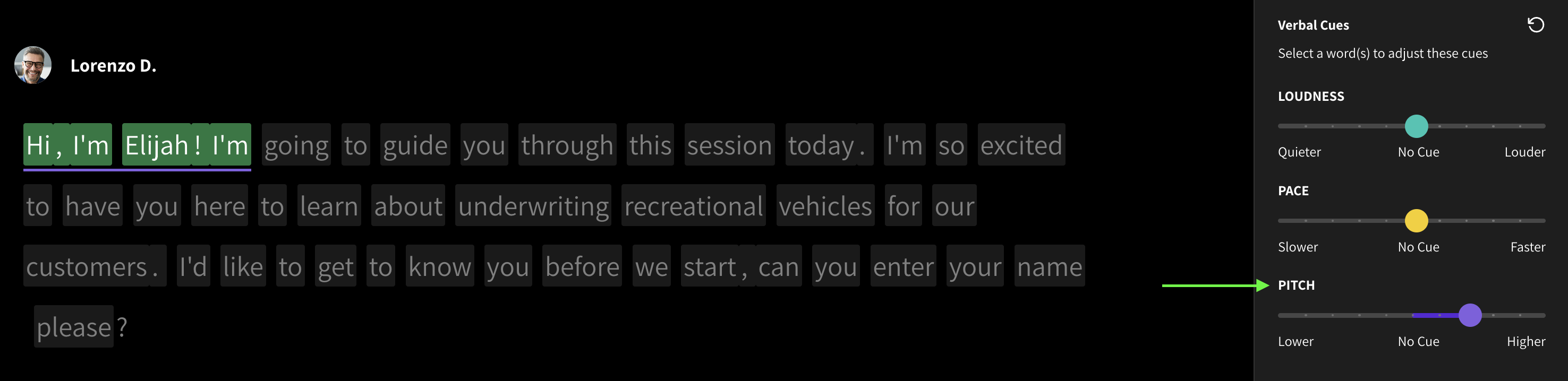
Bug fixes and improvements
Resolved: Clips downloading as empty files
We've resolved a problem that previously caused downloads of clips with special characters in their names to be empty. You can now download your clips without any issues.
Improved: Clip renaming
We have introduced a new text box to make renaming your clips easier.
April 2024
New Features
Favoriting Team Voices
This feature streamlines the voice selection process for your team across projects, saving time and ensuring a consistent brand experience across all touchpoints. Ensure every audio output reflects your brand by creating a curated favorite list of approved voices for your team.
SSML for WellSaid's API
This powerful feature allows developers to enhance voice output by specifying how specific text elements should be pronounced. With SSML for WellSaid API, developers can ensure accurate pronunciation of dates, times, numbers, and more, leading to improved naturalness, accuracy, and comprehensibility of synthesized speech.
Avatar Response Query for WellSaid's API
The Avatar Response Query endpoint provides information about available voices, including speaker_ID, accent, avatar ID, and characteristics. This functionality streamlines voice selection, customization, and experimentation, enhancing efficiency and allowing for creative and innovative applications.
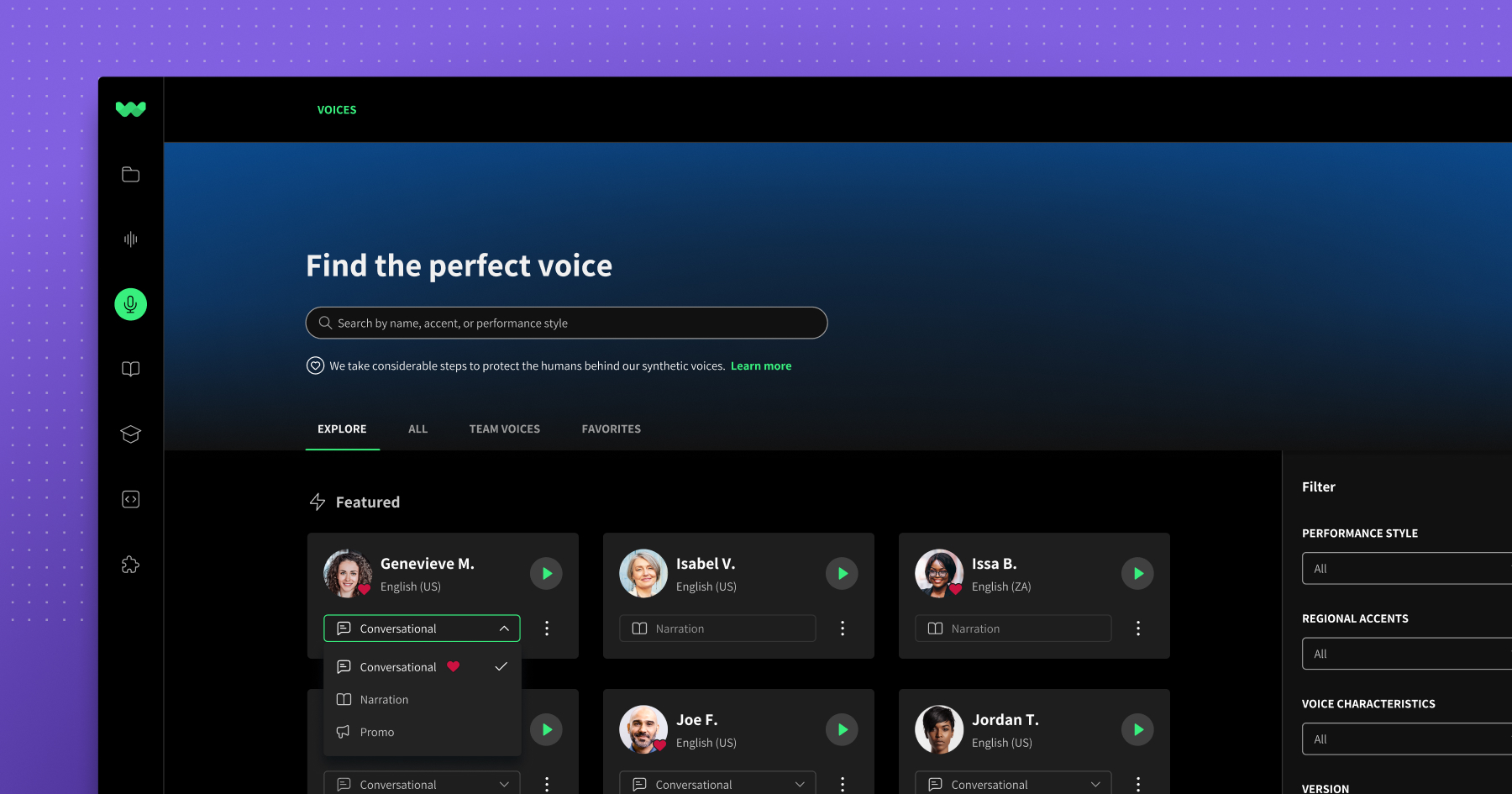
Voices page
Discovering the perfect voice to tell your story is now easier than ever, thanks to our latest update: the Voices page. This central hub showcases a diverse collection of voices, styles, and samples, streamlining your search and providing a unified space for all your favorites.
Explore the new voices page and how it can help you discover the perfect voice for your project!
March 2024
View API character usage in Studio
Monitor your API character usage during each billing period right in Studio!
February 2024
New Features
Self-service teams
Upgrade and manage your plan to unlock Team features autonomously. Take advantage of team features without ever needing to pause for support.
Direct API key access
Seamlessly integrate voice into your product using our API. Experience it firsthand with a 14-day trial.
Bug fixes and improvements
Resolved: Pause cue error in "New (Beta)" model
We've resolved the pausing cues error that some users experienced while creating in our Beta model of Studio. Specifically, the "longer" pause now behaves as intended instead of a shorter pause. This fix ensures that the timing in your cues works as expected for your voiceovers.
We invite you to explore our beta model and experience the improved pause cue again or for the first time! And as always, your input is vital to us. If you have any questions, encounter issues, or want to share your thoughts, feel free to reach out.
January 2024
Respelling Suggestions
Improve your pronunciation with the Respelling suggestions feature, providing accurate suggestions for industry-specific, uncommon, and complex words, among others.
Our Respelling Suggestions feature is powered by Oxford Languages. To learn more, head over to our blog.